It is currently Fri Oct 02, 2026 2:06 pm

All times are UTC - 5 hours [ DST ]


Post new topic Reply to topic  [ 124 posts ]  Go to page Previous  1, 2, 3, 4, 5, 6, 7 ... 9  Next
Author Message
 Post subject: Re: Slide Scanner Recommendations
PostPosted: Sat Dec 13, 2014 3:41 pm 

Joined: Sat Feb 24, 2007 5:45 pm
Posts: 75
Location: Utah
This discussion is spending way too much time on letting the scanner do anything other than scanning. If there is dust, blow it off, or brush it off.

Don't "auto" anything. Don't let the scanner do any correction, color or otherwise. Only use a scanner to do raw scans. On your Epson software, go to the Professional Mode, and down at the bottom, click on Configuration, then on the Color tab, click on No Color Correction. That will gray-out all of the Adjustments on the main screen. Set your resolution, and start scanning.

Any image preservation effort will always have a scanning portion, and a post-scanning (or post-processing) portion.

If you have it, use Photoshop (not Photoshop Essentials, which is a waste of money). GIMP is open source and free. FastStone Image Viewer (my personal choice) is free, and does all the corrections you will ever need, i.e., color levels, straightening, color balance, saturation, contrast, brightness, shadow and highlights. And it's free! Let me say that again, it's free! And a lot easier to use than Photoshop; and it's free.

Send me a private message and we can talk on the phone.

Don Strack


Offline
 Profile  
 
 Post subject: Re: Slide Scanner Recommendations
PostPosted: Sat Dec 13, 2014 5:34 pm 
User avatar

Joined: Mon Aug 05, 2013 2:42 am
Posts: 2112
Location: Seattle, WA - Land of Coffee
Alexander D. Mitchell IV wrote:
Our scanners (the people, not the hardware) at the Md. Rail Heritage Library have been waging war with the software on a couple different scanners (machines, not people) that seems to have a penchant for eliminating letters at random on PRR and N&W Tuscan Red and PRR Brunswick Green, as exemplified perfectly in the N&W diner shot above.
donstrack wrote:
Don't "auto" anything. Don't let the scanner do any correction, color or otherwise. Only use a scanner to do raw scans. On your Epson software, go to the Professional Mode, and down at the bottom, click on Configuration, then on the Color tab, click on No Color Correction. That will gray-out all of the Adjustments on the main screen. Set your resolution, and start scanning.

Any image preservation effort will always have a scanning portion, and a post-scanning (or post-processing) portion.

If you have it, use Photoshop (not Photoshop Essentials, which is a waste of money). GIMP is open source and free. FastStone Image Viewer (my personal choice) is free, and does all the corrections you will ever need, i.e., color levels, straightening, color balance, saturation, contrast, brightness, shadow and highlights. And it's free! Let me say that again, it's free! And a lot easier to use than Photoshop; and it's free.


I rescanned the N&W #494 in raw mode, using 48-bit color and saved as a TIFF file. Using Photoshop, I made several adjustments, resulting in a much more color-balanced image, with all lettering intact, which I then saved, both as the original TIFF file, and as an uncompressed JPEG. I then used the uncompressed JPEG to replace the previous version on RR Picture Archives, so the results of this second attempt should be visible above.

_________________
Additions and corrections are welcome. Thanks in advance.

Have a Merry Christmas and a Happy New Year!

_________________
Ted Brumberg


Offline
 Profile  
 
 Post subject: Re: Slide Scanner Recommendations
PostPosted: Sat Dec 13, 2014 11:31 pm 
User avatar

Joined: Mon Aug 05, 2013 2:42 am
Posts: 2112
Location: Seattle, WA - Land of Coffee
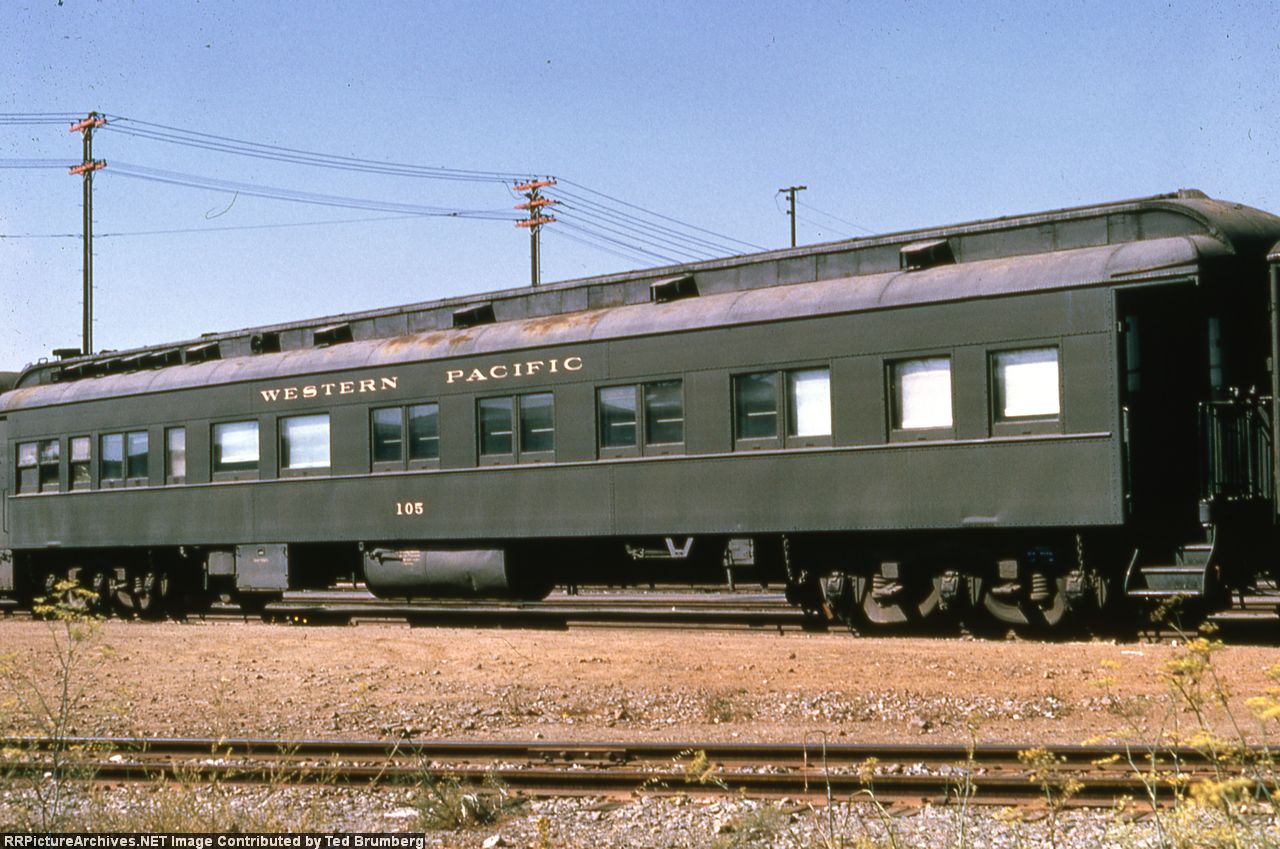
Another Scanned Slide:

WP business car #105 (Pullman, 1914, ex-Philadelphia), date and location unknown, Kodak-processed Ektachrome duplicate slide made by Richard R. Wallin.

Built in 1914 by Pullman in Lot #4211 to Plan #2502A as private car Philadelphia, 1 of 3 such cars (the other 2 were the Boston and the Washington) built in that Lot and outshopped in January 1914. The Philadelphia was 1 of 2 Pullman business cars sold to the WP in April 1942: the other car was the Davy Crockett, which became WP #106. The #105 was later retired and sold to Dick Reynolds, 1 of the partners of Great Western Tours. After the dissolution of GWT, the #105 saw use on the Napa Valley Wine Train. The #106 was later retired and sold to Marty Lummis, and is now in the collection of the WP RR Museum. Neither the date nor the location are written on the slide, which is stamped 1994; therefore, I do not know if this photo was taken before WP retired the #105, during the GWT years, or while in service for Napa Valley.

http://www.rrpicturearchives.net/showPicture.aspx?id=4059259

Image

_________________
Additions and corrections are welcome. Thanks in advance.

Have a Merry Christmas and a Happy New Year!

_________________
Ted Brumberg


Last edited by Rainier Rails on Tue Nov 11, 2025 11:48 pm, edited 1 time in total.

Offline
 Profile  
 
 Post subject: Re: Slide Scanner Recommendations
PostPosted: Mon Dec 15, 2014 5:19 am 
User avatar

Joined: Mon Aug 05, 2013 2:42 am
Posts: 2112
Location: Seattle, WA - Land of Coffee
Another Scanned Slide:

AT&SF 48 seat leg rest chair #2835 (Budd, 1953) at San Luis Obispo, CA, on Saturday, January 20th, 1973, Kodachrome slide taken by Bruce Boles:

http://www.rrpicturearchives.net/showPicture.aspx?id=4060835

Image

_________________
Additions and corrections are welcome. Thanks in advance.

Have a Merry Christmas and a Happy New Year!

_________________
Ted Brumberg


Offline
 Profile  
 
 Post subject: Re: Slide Scanner Recommendations
PostPosted: Mon Dec 15, 2014 7:30 am 
User avatar

Joined: Mon Aug 05, 2013 2:42 am
Posts: 2112
Location: Seattle, WA - Land of Coffee
Another Scanned Slide:

Charter Wire business car Imperial Leaf (#800144, ex-C&NW 4DB-4C-2DR sleeper, P-S, 1942) at Hammond, IN, on Friday, May 13th, 1983, slide taken by Mark Stanek:

http://www.rrpicturearchives.net/showPicture.aspx?id=4060857

Image

_________________
Additions and corrections are welcome. Thanks in advance.

Have a Merry Christmas and a Happy New Year!

_________________
Ted Brumberg


Offline
 Profile  
 
 Post subject: Re: Slide Scanner Recommendations
PostPosted: Mon Dec 15, 2014 11:30 pm 
User avatar

Joined: Mon Aug 05, 2013 2:42 am
Posts: 2112
Location: Seattle, WA - Land of Coffee
Another Scanned Slide:

C&O business car #25 (AC&F, 1931, built for Franklyn Laws [F.L.] Hutton, acquired by C&O in August 1940) in Rougemere Yard, Dearborn, MI, in October 1976, taken by unknown photographer.

Does anybody know the current status/whereabouts of this car? Also, any info on the AC&F Lot and Plan, and the name the car carried while owned by F.L. Hutton would be welcome, as the C&O diagram does not include this info. Thanks in advance!

http://www.rrpicturearchives.net/showPicture.aspx?id=4061318

Image

_________________
Additions and corrections are welcome. Thanks in advance.

Have a Merry Christmas and a Happy New Year!

_________________
Ted Brumberg


Offline
 Profile  
 
 Post subject: Re: Slide Scanner Recommendations
PostPosted: Tue Dec 16, 2014 7:58 am 
User avatar

Joined: Mon Aug 05, 2013 2:42 am
Posts: 2112
Location: Seattle, WA - Land of Coffee
Another Scanned Slide:

N&W business car #300 Roanoke (Pullman, 1917, modernized 1955) at Roanoke on Friday, July 31st, 1987, Kodachrome slide taken by Roy Gabriel.

Now, I've got a small mystery regarding the history of this car. The 1985 NS passenger car diagram folio lists that the N&W #300 was renumbered to NS #5 (1st), but as this photo shows, this was either not applied, or the car had already been sold to private ownership by this time, and the new owners had returned the lettering to N&W #300. The #300 was later repainted dark blue and renamed Ocean (#800353). As far as I can tell, photos show the Ocean inside Bennett Levin's facility in Philadelphia. Please correct me if the car was kept somewhere else. In conclusion, does anybody know the current status/whereabouts of this car? Still in Philadelphia, or moved elsewhere? Thanks in advance!

http://www.rrpicturearchives.net/showPicture.aspx?id=4061449

Image

_________________
Additions and corrections are welcome. Thanks in advance.

Have a Merry Christmas and a Happy New Year!

_________________
Ted Brumberg


Offline
 Profile  
 
 Post subject: Re: Slide Scanner Recommendations
PostPosted: Thu Dec 18, 2014 2:05 am 
User avatar

Joined: Mon Aug 05, 2013 2:42 am
Posts: 2112
Location: Seattle, WA - Land of Coffee
Another Scanned Slide:

Great Western Tours 4DB-4C-2DR sleeper #201 Imperial Sands (ex-UP, P-S, 1942, to Ken Bitten-Kevin Luebke-Classic Rail Tours/PPCX #800143) at Pocatello, ID, on Sunday, May 26th, 1974, Kodachrome slide taken by Thomas G. Acheson:

http://www.rrpicturearchives.net/showPicture.aspx?id=4062779

Image

_________________
Additions and corrections are welcome. Thanks in advance.

Have a Merry Christmas and a Happy New Year!

_________________
Ted Brumberg


Offline
 Profile  
 
 Post subject: Re: Slide Scanner Recommendations
PostPosted: Thu Dec 18, 2014 7:20 am 
User avatar

Joined: Mon Aug 05, 2013 2:42 am
Posts: 2112
Location: Seattle, WA - Land of Coffee
Another Scanned Slide:

GN Ranch Car #1244 White Pines Lake (Mid-Century Empire Builder, AC&F, 1951) as owned by Arvid Benson at Moorhead, MN, in late 1973, Kodachrome slide taken by an unknown photographer.

The #1244 was the Ranch Car acquired by Seashore Trolley Museum director Ralph Day for Biddeford Station, and in 2006 the car was moved to "The Depot Rail Museum & Event Facilities" in Columbus, OH.

http://www.rrpicturearchives.net/showPicture.aspx?id=4063072

Image

_________________
Additions and corrections are welcome. Thanks in advance.

Have a Merry Christmas and a Happy New Year!

_________________
Ted Brumberg


Offline
 Profile  
 
 Post subject: Re: Slide Scanner Recommendations
PostPosted: Thu Dec 18, 2014 1:52 pm 

Joined: Mon May 24, 2010 10:22 am
Posts: 548
This is me hard at work scanning slides, the scanner has a 50 slide tray in progress and several trays ready to go. Now where is my blanky, it's nap time.

-Hudson


Attachments:
IMG_0174s.jpg
IMG_0174s.jpg [ 186.47 KiB | Viewed 11506 times ]
Offline
 Profile  
 
 Post subject: Re: Slide Scanner Recommendations
PostPosted: Thu Dec 18, 2014 10:13 pm 
User avatar

Joined: Mon Aug 05, 2013 2:42 am
Posts: 2112
Location: Seattle, WA - Land of Coffee
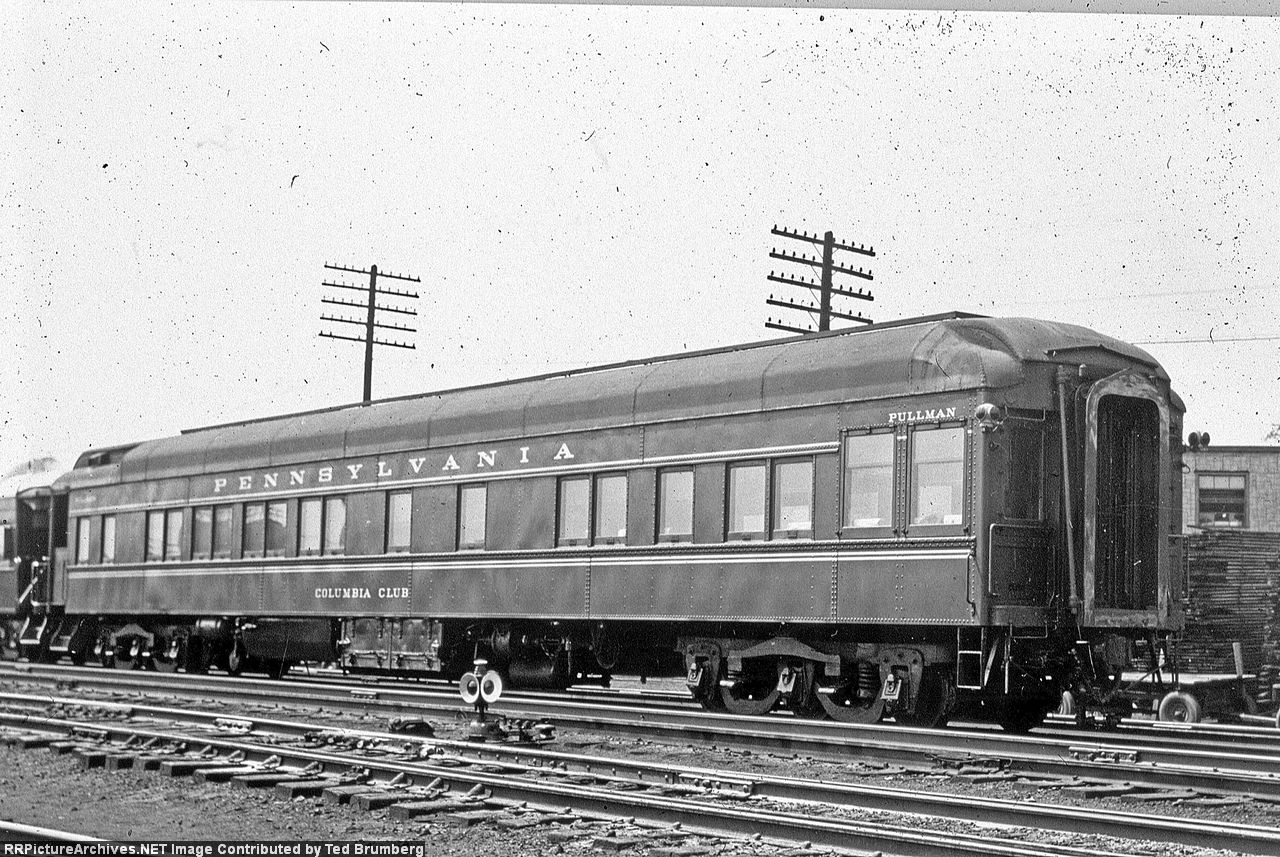
Another Scanned Slide:

PRR 8S sleeper buffet lounge solarium observation #8623 Columbia Club (Pullman, Lot #6274, Plan #3989A/#3989U, 1929) at an unknown location on an unknown date, duplicate slide taken by an unknown photographer.

With this black & white slide, after not being satisfied with the results of the 1st scan, I decided to scan it a 2nd time in raw mode, save it as a TIFF file and run corrections in Photoshop. With Photoshop, I was able to balance out the contrast and made many of the underbody features and the observation end of the sleeper much more visible. Yes, this process did reveal numerous objects, but I feel the overall result was worth the extra steps.

http://www.rrpicturearchives.net/showPicture.aspx?id=4063543

Image

_________________
Additions and corrections are welcome. Thanks in advance.

Have a Merry Christmas and a Happy New Year!

_________________
Ted Brumberg


Last edited by Rainier Rails on Tue Nov 11, 2025 11:50 pm, edited 1 time in total.

Offline
 Profile  
 
 Post subject: Re: Slide Scanner Recommendations
PostPosted: Fri Dec 19, 2014 1:47 am 

Joined: Thu Nov 22, 2007 5:46 am
Posts: 2611
Location: S.F. Bay Area
Rainier Rails wrote:
I rescanned the images using dust removal (set to medium) instead of ICE, and the results were as to be expected. In the #5630 photo, the bright lines around the white portions, trucks, battery boxes, and rails were gone, however, dust removal on the medium setting did not remove the few dust particles present on the slides; with further scans I'll set dust removal to high. Also, I remembered that on the original scans I had also selected grain reduction (set to medium), which I did on this second try as well.

Alexander D. Mitchell IV wrote:
Our [staff] have been waging war with the software on a couple different scanners that seems to have a penchant for eliminating letters at random

Jeff Lisowski wrote:
I'm finding scanning slides is practically an art unto itself.

No. RETOUCHING is practically an art unto itself. SCANNING is mechanical, either you did it correctly, or not. (not=dust, tilted slide, dirty glass).

All the above problems relate to retouching inside the scanner software. Which is a result of stubbornly disregarding the advice we've been trying to give you!

….And just to clear up a misconception, those "adjustments" in the scanner software change nothing in the scanner mechanism. The scanner transmits the exact same data whether you are scanning raw or doing heavy "adjustments". The "adjustments" are actually retouching, done "digitally" after the scan. Sort of like the noxious "digital zoom" in cameras.

Again…
1. Turn off every single retouching feature in your scanner software, and scan RAW to a lossless format like TIF.
2. Inspect the scan ONLY for mechanical scanning defects: dust, tilted slide, etc.
3. Original slides to cold storage. You will never use them again.
4. Back up the original TIFs.
5. On a copy, use proper image processing software to retouch to your heart's content.

Proper image processing software (e.g. Photoshop, GiMP) can target specific areas of the image, gives a cornucopia of filters and effects, lots of adjustments within each filter, and a preview pane so you can see what you're doing. And unlimited steps of undo. A ramped fading from one side of the slide to another? There's a tool for that. Want to adjust levels to a complex curve? No prob. Really, you can do anything with patience, experimentation and a bit of googling.


Jeff Lisowski wrote:
donstrack wrote:
This discussion is spending way too much time on letting the scanner do anything other than scanning. If there is dust, blow it off, or brush it off. Don't let the scanner do any correction, color or otherwise.

I will disagree on this.

Each slide is different. I have tons of slides that brown out because of age. using the color restoration helps tremendously in bringing the image back to life.

Still missing it.

Yes, of course you'll need to retouch. We are saying "not at scan time". Make it a second separate operation done later, after you have validated and backed up the raw scans.

When you're scanning, Just Scan. Square, dust-free, no hairs.

When you're retouching, Just Retouch. With software ideal for that.

Why, you say? At least 4 reasons.

1. Quality. Photoshop/clones blow away any "one size fits all" scanner software. You'll never have Sandy's "letters on the side of the car disappearing" because there's a human intelligence watching for that. (It could even be quicker, I can adjust an image in Photoshop faster than I can "pre-scan". I never pre-scan.)
2. The future. Scan machines won't be better in 2030, but retouching software certainly will.
3. Retouching is inherently destructive. Retain the original so you can go back to it.
4. Freedom. Since the original is secure, it is not irresponsible to be innovative/risky in the retouch.

Heck, you might even make the original available to the serious researcher to inspect/retouch himself.

I'm not saying "scan 1000 slides, then retouch 1000 slides" (though that is more efficient.) If you want to "scan one, backup one, photoshop one, scan two, backup two, photoshop two" that's fine. Just do that backup.


Offline
 Profile  
 
 Post subject: Re: Slide Scanner Recommendations
PostPosted: Thu Dec 25, 2014 4:25 am 
User avatar

Joined: Mon Aug 05, 2013 2:42 am
Posts: 2112
Location: Seattle, WA - Land of Coffee
Another Scanned Slide:

Circus World Museum #46 The Baraboo (10S sleeper lounge observation, ex-PULL Monte Baldo, 1925, Lot #4923, Plan #3521A) in Milwaukee in July 1987, Kodachrome slide taken by Arnie Burchardt:

http://www.rrpicturearchives.net/showPicture.aspx?id=4067877

Image

_________________
Merry Christmas!

_________________
Ted Brumberg


Offline
 Profile  
 
 Post subject: Re: Slide Scanner Recommendations
PostPosted: Sat Dec 27, 2014 1:29 am 
User avatar

Joined: Mon Aug 05, 2013 2:42 am
Posts: 2112
Location: Seattle, WA - Land of Coffee
I've started a new thread for the 120 Al Chione slides I recently acquired: http://www.rypn.org/forums/viewtopic.php?f=1&t=37475

Another Scanned Slide:

GN baggage-dormitory #1201 (AC&F, 1950, Mid-Century Empire Builder) in Big Sky Blue at an unknown location in June 1974, Kodachrome slide taken by an unknown photographer:

http://www.rrpicturearchives.net/showPicture.aspx?id=4069111

Image

_________________
Additions and corrections are welcome. Thanks in advance.

Have a Merry Second Day of Christmas and a Happy New Year!

_________________
Ted Brumberg


Offline
 Profile  
 
 Post subject: Re: Slide Scanner Recommendations
PostPosted: Sat Dec 27, 2014 11:43 pm 

Joined: Sun Sep 05, 2004 1:21 pm
Posts: 243
Location: Niagara Falls, Ontario
I can't put my finger on one of my Chione scans at the moment, but here are 2 pics done on my Epson V600. The CN Fort Erie coal tower is from a B&W negative, the CP at Niagara Falls is a standard slide. Minimal editing, mostly because Im not that familiar with the whole editing process. I do like the Epson V600, easy to use and can scan a variety of different types of images.

Ken Jones
Niagara Railway Museum Inc.
www.nfrm.ca


Attachments:
File comment: Canadian Nationals Fort Erie coal dock was torn down in the 1960's and replaced by a much smaller conveyor set up.
CN coal dock fort erie june 20, 1958sm.jpg
CN coal dock fort erie june 20, 1958sm.jpg [ 124.89 KiB | Viewed 11200 times ]
File comment: CP Job 1 crosses Clifton Hill in Niagara Falls. This track is now gone, as is the giant ferris wheel in behind.
cp8227_cliftonhill_july 31-80sm.jpg
cp8227_cliftonhill_july 31-80sm.jpg [ 126.34 KiB | Viewed 11200 times ]
Offline
 Profile  
 
Display posts from previous:  Sort by  
Post new topic Reply to topic  [ 124 posts ]  Go to page Previous  1, 2, 3, 4, 5, 6, 7 ... 9  Next

All times are UTC - 5 hours [ DST ]


You cannot post new topics in this forum
You cannot reply to topics in this forum
You cannot edit your posts in this forum
You cannot delete your posts in this forum
You cannot post attachments in this forum

Jump to: